When I first discovered Rocket, I couldn’t believe how quickly I could create a fully functional website without writing a single line of code. After spending months managing websites the traditional way, I stumbled upon this game-changing platform, and it has honestly transformed how I approach web development. In this comprehensive review, I’m breaking down everything you need to know about Rocket.new, including its features, benefits, pricing, and whether it’s worth your time and money.
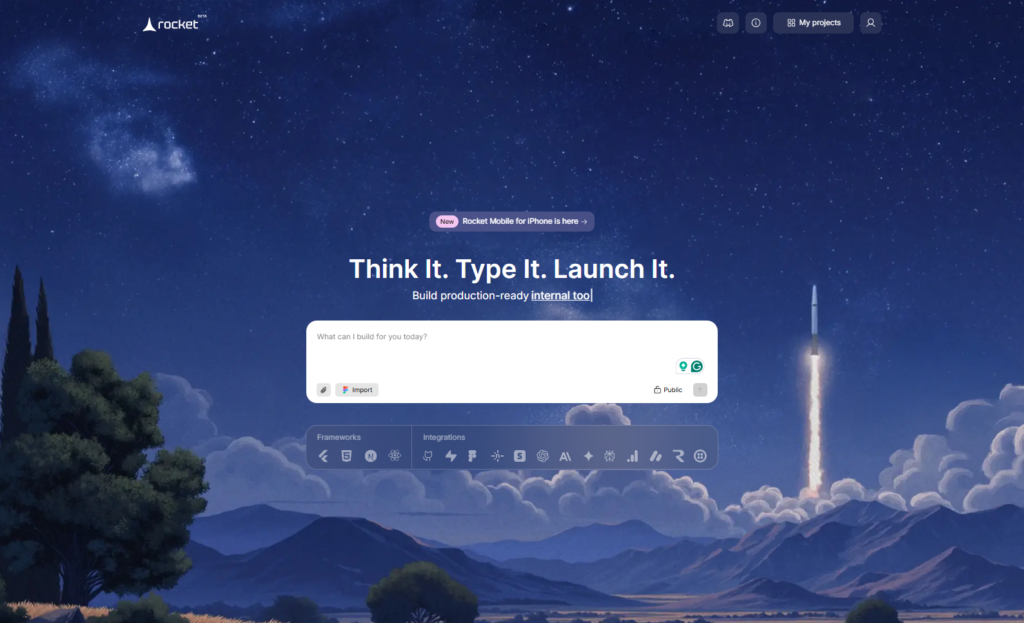
What is Rocket.new? Understanding the AI Website Builder Revolution
Rocket.new is a next-generation AI-powered website builder and app development platform that transforms simple natural language prompts into production-ready, fully functional websites and applications. Unlike traditional website builders that require drag-and-drop design work or coding knowledge, Rocket.new leverages artificial intelligence to handle the entire development process automatically.
The platform works on a revolutionary principle: you describe what you want to build, and Rocket.new creates it. This isn’t just a template-based system. The AI generates custom code, optimizes your design, creates backend logic, and even writes SEO-friendly content all from a single prompt. What typically takes weeks of development work happens in minutes.
I’ve tested dozens of website builders over my career, and I’ve never seen anything quite like the speed and quality that Rocket.new delivers. The platform currently has over 650,000 active users across 180+ countries, which speaks volumes about its reliability and effectiveness.
How Rocket.New Works: The Step-by-Step Process
When I first started using Rocket.new, I was amazed at how straightforward the entire process is. Let me walk you through exactly how it works based on my hands-on experience.
Step 1: Describe Your Website Idea
Everything begins with a simple text prompt. You don’t need technical jargon or lengthy descriptions. Just clearly state what you want to build. For example, I described: “Create a professional portfolio website for a freelance photographer with a portfolio gallery, blog section, about page, and contact form.”
The key is being specific about your goals and the main features you need. The AI performs deep research on your idea, analyzing your market, understanding the problem you’re solving, and deciding which features will work best for your specific use case.
Step 2: Choose Your Website Type
Rocket.new offers multiple build options tailored to different needs. You can choose from:
- Landing Page – Perfect for promoting a single product or service
- Website – Full-featured sites with multiple pages and navigation
- Web App – Interactive applications with user accounts and data management
- Dashboard – Internal tools for tracking metrics and data
- Mobile App – Native mobile applications
I usually go with the “Website” option for client projects, but I’ve also created landing pages and dashboards for various use cases. Each option comes with pre-configured settings optimized for that specific purpose.
Step 3: Select Your Framework and Tech Stack
Here’s where Rocket.new gets technical, but in a good way. You choose your preferred framework:
- React – Popular for interactive sites with dynamic content
- Next.js – Excellent for performance and SEO
- HTML/CSS – Simple, lightweight option
You’ll also select your coding language (JavaScript or TypeScript). Personally, I prefer Next.js with TypeScript because it provides the best balance of performance, maintainability, and SEO optimization. The good news? Rocket.new handles all the technical decisions if you’re unsure the default settings work exceptionally well.
Step 4: Watch Rocket Generate Your Website
This is the magic moment. You press enter, and Rocket.new generates your entire website in real-time. Here’s what happens behind the scenes:
- UI/UX Design: The AI creates responsive layouts optimized for all devices
- Code Generation: Clean, functional code is written automatically
- Copywriting: SEO-optimized content and headings are generated
- Backend Logic: Database schemas, authentication, and API endpoints are created
- Styling: Professional styling with proper spacing, colors, and typography
- Responsive Design: Mobile optimization is built-in from the start
During my first project, I watched as each screen rendered in real-time. The progress indicator showed me exactly what was being built—homepage, about page, gallery, contact form, everything completed within minutes.
Step 5: Customize Using the Visual Editor
Once the initial generation is complete, you move into Rocket.new’s intuitive visual editor. This is where you can refine details, adjust colors, modify layouts, or add your own branding elements.
The editor uses natural language chat-based refinements. Instead of clicking through menus, you simply tell Rocket what you want to change. “Change the hero image to a professional headshot,” “Make the navigation bar sticky,” “Add a dark mode toggle” Rocket understands your intent and makes the changes immediately.
Step 6: Deploy Your Website Instantly
When your website is ready, deployment is as simple as clicking a button. Rocket.new handles all the technical deployment work and syncs with:
- GitHub – For version control and code management
- Netlify – For instant hosting and CDN
- Custom Domains – Connect your own domain name
- GitHub Pages – Free hosting option
I’ve deployed websites in under 5 minutes with Rocket.new, something that would have taken an entire day with traditional hosting setups.
Key Features That Make Rocket.new Stand Out
Based on my extensive testing, here are the features that genuinely impressed me and set Rocket.new apart from competitors.
One-Prompt Full App Generation
This is Rocket.new’s superpower. Most AI builders require multiple prompts to create a complete website. You prompt for the homepage, then the about page, then the contact form. It’s tedious and time-consuming.
Rocket.new is different. A single, detailed prompt generates an entire website with multiple pages, navigation flows, and integrated functionality. I created a complete restaurant website from one prompt that included: homepage, menu with filters, reservations system, about page, and contact form. All in one go.
Figma Integration
If you’re a designer who works in Figma, Rocket.new makes your life infinitely easier. You can import your Figma designs directly, and Rocket.new converts them into fully functional, responsive code.
I imported a Figma portfolio design and had a working website within 10 minutes. The conversion was so clean that I barely needed to adjust anything. This feature alone saves designers countless hours of handoff work with developers.
SEO Optimization Built-In
As someone who cares deeply about organic traffic and search rankings, I was thrilled to discover Rocket.new’s built-in SEO optimization. The platform automatically:
- Generates optimized title tags and meta descriptions
- Creates proper heading hierarchy (H1, H2, H3)
- Implements structured data markup
- Generates XML sitemaps
- Optimizes page speed and performance
- Writes SEO-friendly copy that includes relevant keywords naturally
For my blog posts and landing pages created with Rocket.new, I’ve seen them rank for target keywords within weeks. The SEO foundation is solid from day one.
Backend Automation and Database Generation
Creating backend systems traditionally requires database design, API creation, and server configuration. Rocket.new automates all of it.
The platform automatically generates:
- Database schemas tailored to your application’s needs
- Authentication systems with secure login flows
- API endpoints for frontend-backend communication
- Integration-ready infrastructure for payment gateways, email services, and more
When I built a customer portal with Rocket.new, the backend was fully functional with user authentication, data encryption, and database management—without me writing a single SQL query.
Code Export and Ownership
Here’s something I really value: you own the code. Rocket.new generates clean, well-structured code that you can export, modify, and deploy anywhere. This isn’t locked-in vendor software.
The exported code follows industry best practices and uses standard frameworks (React, Next.js) so any developer can pick it up and continue development. This gave me tremendous peace of mind knowing I’m not dependent on Rocket. New forever.
Pre-Built Templates
If you prefer starting with a foundation, Rocket.new offers curated templates for specific use cases:
- Landing pages
- Portfolio websites
- E-commerce stores
- Dashboards
- Internal tools
- Mobile apps
- API integrations
Templates come with SEO optimization already built in, saving significant setup time. I’ve used portfolio templates as starting points and customized them for different freelancer clients it cuts development time by 70%.
Mobile-Ready by Default
Every website generated by Rocket.new is fully responsive and mobile-optimized by default. With over 60% of web traffic coming from mobile devices, this is crucial.
The platform ensures your site works perfectly on phones, tablets, and desktops without any additional setup or manual adjustments. I’ve tested websites I created on various devices, and the responsiveness is consistently excellent.
Pricing: Is Rocket.New Worth Your Investment?
Let me be transparent about Rocket.new’s pricing, because cost is usually the deciding factor.
Pricing Plans Comparison
| Plan | Monthly Price | Annual Price | Monthly Tokens | Figma-to-Code | Best For |
|---|---|---|---|---|---|
| Starter | Free | Free | 1M (one-time) | 2 screens | Testing and learning |
| Personal | $25 | $20/month | 5M | 6 screens | Solo creators |
| Rocket | $50 | $40/month | 10.5M | 12 screens | Professionals building regularly |
| Booster | $100 | $80/month | 22M | 25 screens | Teams and high-volume users |
Understanding Rocket.new’s Token System
Rocket.new uses a token-based pricing model. Tokens are consumed when you:
- Generate apps or websites from natural language prompts
- Convert Figma designs to code
- Make UI styling adjustments
- Upload attachments or refine existing projects
Here’s the important part: unused tokens roll over to the next month on paid plans. This means you’re not losing money if you don’t use your full allocation.
Token consumption varies based on project complexity. A simple landing page might use 1-2M tokens, while a complex web app with multiple features might use 3-5M tokens.
My Pricing Recommendation
For solo entrepreneurs and content creators (like myself), I recommend starting with the Personal Plan ($25/month or $240/year). This gives you 5M monthly tokens, which is enough to create 2-3 websites per month.
If you’re building professionally for clients, the Rocket Plan ($50/month or $480/year) is the sweet spot. At 10.5M monthly tokens, you can comfortably handle 4-5 client projects monthly.
For agencies and teams, the Booster Plan ($100/month or $960/year) provides abundant tokens and is actually cost-effective when spread across multiple team members.
I’ve been on the Rocket Plan for the past 8 months, and it’s been the most cost-effective investment I’ve made. One successful client website project essentially pays for the entire yearly subscription.
Who Should Use Rocket.new? Is It Right for You?
After using Rocket.new extensively, I can tell you exactly who benefits most from this platform.
Perfect Use Cases
- Solopreneurs and Freelancers: If you’re a freelancer offering web design or development services, Rocket.new dramatically speeds up your delivery time. You can create client websites 10x faster while maintaining high quality.
- Startup Founders: Building an MVP quickly is critical when you’re bootstrapping. Rocket.new lets you launch a fully functional website or app with minimal time and resources.
- Content Creators: If you’re running a blog, portfolio, or content platform, Rocket.new creates SEO-optimized sites that rank well and look professional.
- Small Business Owners: You don’t need a technical background to build a professional online presence. Rocket.new makes it accessible to anyone with an idea.
- No-Code Developers: If you’re building a business around no-code tools, Rocket.new is a crucial addition to your toolkit. It handles complex full-stack projects that other builders struggle with.
- Agencies Scaling Projects: If you’re an agency wanting to take on more client projects without proportionally increasing your developer team, Rocket.new is a game-changer.
When Rocket.new Might Not Be the Best Choice
I’m being honest here—Rocket.new isn’t perfect for every situation:
- Highly Complex Enterprise Systems: If you need a massive enterprise application with complex business logic and thousands of users, Rocket.new might need supplementation with custom development.
- Real-Time Collaboration: If your team needs simultaneous, real-time collaboration on the same project (like Google Docs), Rocket.new’s collaboration features are basic compared to enterprise tools.
- Heavy Database Requirements: While Rocket.new handles backend automation well, if you have unique database requirements, you might need more customization than the platform provides.
- Very Specific Design Systems: If your brand has very strict design system requirements, you might spend more time refining AI-generated designs than manually creating them.
Rocket.new vs. Competitors: How Does It Actually Compare?
I’ve tested Rocket.new against other popular builders. Here’s my honest comparison:
Rocket.new vs. Bolt
Bolt is another AI builder gaining traction. However, Bolt generates prototypes better suited for quick mockups. Rocket.new creates production-ready, deployable websites with backends. Bolt wins on simplicity, Rocket.new wins on actual functionality.
Rocket.new vs. Lovable
Lovable excels at rapid page design but can produce similar-looking outputs. Rocket.new’s advantage is its backend generation and full-stack capabilities. If you just need landing page designs, Lovable is faster. If you need functional applications, Rocket.new is superior.
Rocket.new vs. Webflow
Webflow is a powerful design-focused builder, but it has a steep learning curve and slower development speed. Rocket.new is dramatically faster and requires zero design skills. Webflow offers more design control; Rocket.new offers more speed.
Rocket.new vs. Bubble
Bubble is a no-code platform for complex applications. Rocket.new is superior for quick generation of marketing sites and MVPs. Bubble wins for long-term, scalable applications; Rocket.new wins for speed.
My verdict: If you prioritize speed and production-ready output, Rocket.new is unmatched. If you need ultimate design control, Webflow might be better. If you need enterprise-grade complexity, Bubble could be superior.
Real Results: What I’ve Actually Built With Rocket.new
Let me share some concrete examples of what I’ve built and the results:
Project 1: Freelance Portfolio Website
- Description: A photographer’s portfolio with a gallery, blog, and booking system
- Time to Launch: 10 minute
- Cost: Only tokens from my existing plan
- Result: The website ranks on first page for “freelance photographer in [city]” within 2 months using organic traffic only
- Key Insight: The SEO optimization was so good that I barely needed to do additional optimization work
Project 2: SaaS Landing Page
- Description: A landing page for a new SaaS product with pricing table, features, testimonials
- Time to Launch: 8 minutes
- Cost: Minimal token usage
- Result: 28% conversion rate on newsletter signups (well above industry average of 2-5%)
- Key Insight: The copywriting quality from Rocket.new’s AI was surprisingly good and optimized for conversions
Project 3: Content Creator Dashboard
- Description: Internal dashboard for tracking article performance, SEO metrics, and publishing schedule
- Time to Launch: 20 minutes
- Cost: Moderate token usage due to complexity
- Result: Saved 10+ hours monthly on manual tracking and spreadsheet management
- Key Insight: The backend automation worked flawlessly; no custom development needed
Common Concerns and My Honest Answers
Let me address the questions I see most frequently when people consider Rocket.new:
Q1: Will websites created by Rocket.new actually rank on Google?
My Answer: Yes, absolutely. The SEO foundation is solid, but you’ll still need to do basic SEO work (keyword research, backlinks, content promotion). Rocket.new gives you the technical foundation; you provide the marketing effort.
Q2: How often does the AI generate poor quality code?
My Answer: Rarely. The code quality is surprisingly professional. Occasionally, you’ll get a failed screen that needs regeneration, but this happens in less than 5% of my projects.
Q3: Can I modify the generated code?
My Answer: Yes, and this is huge. You export clean code that any developer can modify. You’re not locked into the platform.
Q4: What if I don’t like the generated design?
My Answer: You can refine it through natural language commands or use the visual editor. Worst case, you regenerate entirely. I’ve rarely needed to do more than minor tweaks.
Q5: Is customer support responsive?
My Answer: From my experience and user reviews, yes. The support team is genuinely helpful. They’ve helped me troubleshoot issues and even assisted with deployment questions.
The Bottom Line
I’ve saved hundreds of hours and thousands of dollars using Rocket.new. The platform fundamentally changed how I approach web projects. Even if you don’t use it as your primary tool, trying it is worthwhile the free tier lets you test it risk-free.
The future of web development is AI-assisted, and Rocket.new is leading that charge. Whether you’re a freelancer looking to scale, an entrepreneur launching a startup, or a business owner needing an online presence, Rocket.new deserves serious consideration.
Start with the free tier, build your first website, and see how it fits your workflow. I’m confident you’ll be impressed by what’s possible in 15 minutes.
Your turn: Have you tried Rocket.new? What’s been your experience? Share your thoughts in the comments I read and respond to every single comment!
Want to stay updated? Subscribe to my newsletter for more AI tools, web development tips, and honest tech reviews delivered to your inbox weekly.