Powerful Google Antigravity: Transform Your Development Workflow in 2025
When I first started working with Google Antigravity, I was genuinely amazed at how it transforms the entire development experience. Let me walk you through everything you need to know about this groundbreaking AI tool that’s reshaping how developers build software in 2025.
What Is Google Antigravity? Understanding the Revolution
This isn’t your typical IDE or code editor. It’s a completely new paradigm called an agentic development platform that launched in 18 November 2025 as a free public preview. Built on the power of Gemini 3 Pro, this platform represents a fundamental shift in how developers interact with artificial intelligence.
Think of it as having multiple AI agents working alongside you not just suggesting code, but actually building, testing, and verifying applications autonomously. When you describe what you want to build, the system understands your intent and executes the entire task from start to finish. The platform supports multiple AI models including Claude Sonnet 4.5, OpenAI’s GPT-OSS, and of course Gemini 3 Pro, making it incredibly flexible for different development needs.
The Game-Changing Agent-First Architecture
The most revolutionary aspect is its agent-first design philosophy. Unlike traditional AI coding assistants that suggest code snippets line by line, this platform empowers autonomous AI agents to take control of your entire development environment. This means agents can write code across multiple files, run terminal commands, execute tests, open your browser, verify that applications work, and report back with complete transparency.
Here’s what makes this different: you’re not micromanaging every decision. Instead, you describe a complex task say, “Build a flight tracking application with real-time updates”and the system plans the architecture, writes all necessary code, configures databases, sets up API integrations, runs quality checks, and demonstrates that everything works correctly in your browser.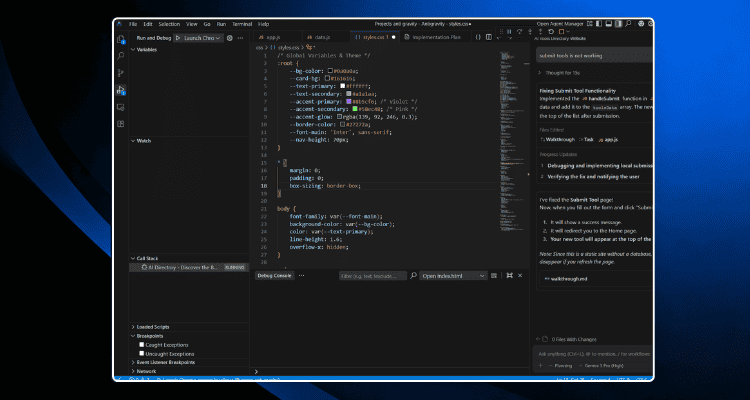
Three Powerful Work Modes
When using the platform, you have three distinct modes to choose from based on how much control you want:
Autopilot Mode (Agent-Driven Development)
This is pure automation. You describe what you want, and the system handles everything autonomously without asking for permission at each step.
Recommended Mode (Agent-Assisted Development)
This balanced approach lets the AI do most of the heavy lifting while asking for your approval on important architectural decisions. Most developers find this the sweet spot between productivity and control.
Review-Driven Mode
Maximum control the system asks permission before performing almost any action, making it ideal when you’re learning how it works or dealing with critical code.
Artifacts: The Transparency Revolution
Here’s where this tool truly stands apart from other AI development platforms. Instead of overwhelming you with cryptic logs showing every tool the agent called, it generates Artifacts concrete, human-readable deliverables that show exactly what happened.
When you work with the platform, these Artifacts include:
- Task Lists: Step-by-step breakdown of what the agent plans to accomplish
- Implementation Plans: Detailed reasoning about the solution approach
- Code Diffs: Precise before-and-after views of all code changes
- Screenshots: Visual proof of your editor and application state
- Browser Recordings: Time-lapse videos showing the agent testing your application in real-time
- Walk-through: Complete documentation of the entire execution process
This transparency transforms how you work with AI development tools. You’re never wondering if the AI did the right thing you have concrete proof.
Two Distinct Interfaces: Choose Your Workflow
The platform gives you flexibility in how you interact with it. The Editor View provides a traditional IDE experience with the AI assistant in a side panel, perfect for hands-on developers who want to give inline commands like “Optimize this function” or “Add documentation.” This familiar interface makes the tool accessible to developers at any skill level.
The Manager View takes things to another level entirely. Imagine dispatching multiple AI agents simultaneously one fixing bugs, another refactoring code, a third writing tests. All while you orchestrate from a command center. This parallel approach to development accelerates complex projects dramatically.
Performance Powered by Gemini 3 Pro
When you work with this platform, you’re leveraging Google’s most advanced coding model: Gemini 3 Pro. The numbers speak for themselves Gemini 3 Pro achieves an impressive 1,501 Elo score and scores 76.2% on SWE-bench Verified, which measures how well AI can handle real software engineering tasks from production codebases.
What this means in practical terms: the system excels at terminal operations, web development, and complex multi-file projects. It consistently outperforms previous versions on tasks that require understanding context across entire applications.
The Learning Intelligence Behind the System
One feature that impressed me is its ability to learn and improve over time. The platform maintains a knowledge base of code snippets, patterns, and solutions you’ve built successfully. As you use it, the AI agents reference this growing library, allowing the system to become increasingly effective with your specific coding style and project patterns.
This means your first project is good. Your tenth project? Exceptional. The platform literally gets smarter as you use it.
Getting Started: Free, Generous, and Accessible
Here’s the best part: Google Antigravity is completely free during the public preview. Google provides what they call “generous rate limits” that refresh every five hours enough capacity for most developers unless you’re running massive concurrent tasks.
You can download it for Windows, macOS, or Linux directly from antigravity.google. Setup takes minutes, and you’re immediately ready to start building with AI.
The Asynchronous Feedback Loop: Comments as a Superpower
When working with the platform, you don’t need to interrupt the agent’s work to provide feedback. Just like leaving comments in Google Docs, you can annotate the Artifacts with corrections, suggestions, or new requirements. The system reads these comments and incorporates them seamlessly without disrupting the development flow a workflow innovation that feels obvious once you’ve experienced it.
The Real-World Impact
When developers use this agentic platform, they report being able to complete in hours what previously took days. A junior developer gains capabilities approaching senior developers. Senior developers can focus on architecture and design instead of implementation details.
The job market implications are significant though not necessarily negative. This tool augments human developers rather than replacing them. It eliminates tedious busywork and lets developers focus on creative problem-solving, architectural decisions, and strategic thinking.
Conclusion: The Next Era of Development
When I use Google Antigravity, I’m genuinely excited about what it represents. This is what “AI tools” actually look like when they work brilliantly not hype, not incremental improvements, but transformative technology that fundamentally changes how humans work.
Ready to experience the future of development?
Download Google Antigravity today and transform how you build software. Visit antigravity.google to get started. The revolution in AI-assisted development is here, and it’s completely free to star